

Terminal notifications
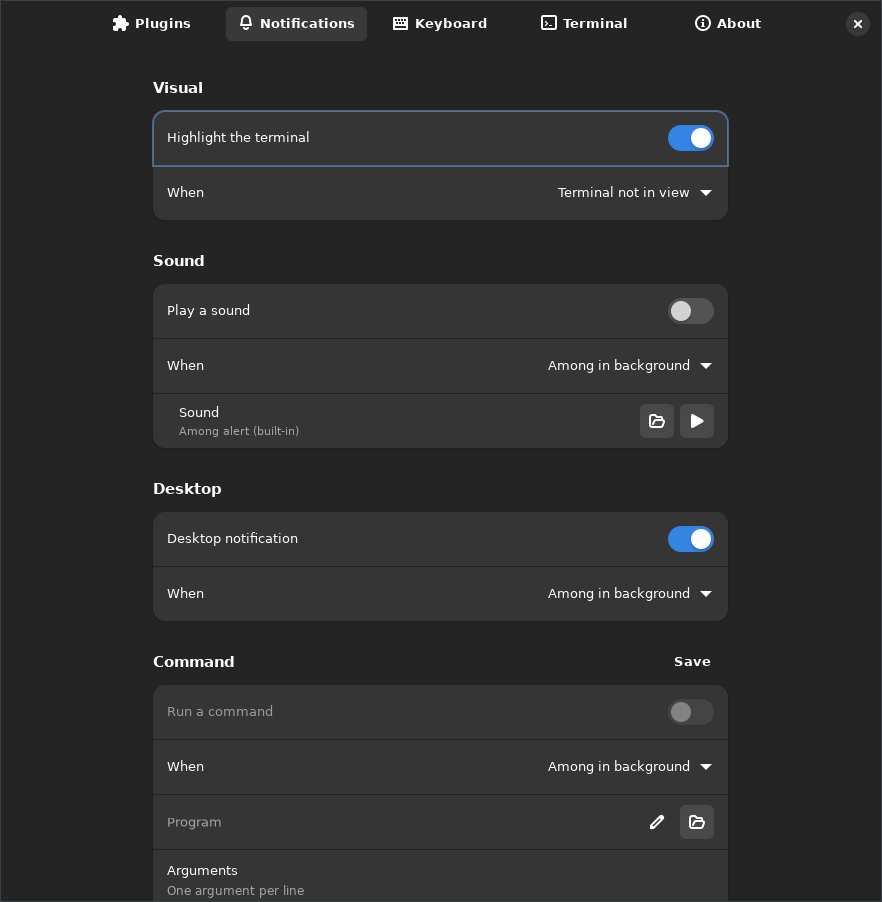
A terminal bell can mark the pane and workspace, play a sound, send a desktop notification or run a command. Open Settings with <Ctrl> + , and choose Notifications to change what happens.
Marks in the window
Highlight the terminal marks the pane header and its workspace row when an unfocused terminal rings. The stripe can pulse. Focus that terminal to clear the mark. This channel is on by default for terminals you are not viewing; turn it off when the marks distract you.
Channels and conditions
Each channel has a When choice:
- Always.
- Terminal not in view. This includes the application being in the background.
- Among in background.
| Channel | Default | What it does |
|---|---|---|
| Highlight the terminal | On | Marks the pane and workspace until you focus the terminal. |
| Play a sound | Off | Plays the bundled alert or a local WAV. |
| Desktop notification | On | Shows a system banner for a background application. |
| Run a command | Off | Runs the configured program with literal arguments. |
| A plugin channel | Off | Delivers through a channel supplied by a plugin. |
Desktop notification
The banner names the workspace, terminal title and directory. That text can appear on the lock screen; turn Desktop off if it would reveal private information. Clicking the banner opens the terminal that rang.
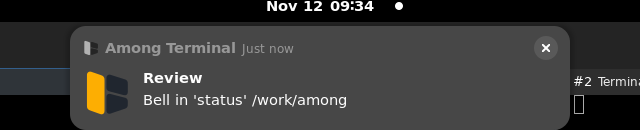
The application needs a desktop launcher for the banner and click to work. DEB and RPM packages install it. For an AppImage or archive, follow desktop notification integration.
Sound
The bundled alert needs no setup. Choose a local WAV to use your own sound. Use Play and Stop to preview it. The file must be uncompressed PCM or IEEE-float WAV, at most 10 seconds and 10 MiB, with a sample rate up to 96 kHz.
Run a command
Choose an absolute program path and put each argument on its own line, then select Save. Arguments are passed literally: shell quoting and operators do not apply. Saving does not run the command. Turn the channel on when you are ready.
Plugin channels
A plugin can provide an additional delivery channel. It starts off and has its own switch. Review the plugin's delivery role and access before enabling it; see plugin notifications. Delivery plugins have no network access.
Where the marks appear
See panes and workspaces for the pane and workspace markers, and Preferences for the settings tab.